Purpose
Purpose
Can a tiny control deck measurably speed up interface design—and become a bridge to agentic work?
Can a tiny control deck measurably speed up interface design—and become a bridge to agentic work?
Purpose
Can a tiny control deck measurably speed up interface design—and become a bridge to agentic work?
A two-week comparison in Figma became a broader lesson about designing better interfaces for human—and agentic—work.
A two-week comparison in Figma became a broader lesson about designing better interfaces for human—and agentic—work.
Sed ut perspiciatis unde omnis iste natus error sit voluptatem accusantium doloremque laudantium, totam rem aperiam, eaque ipsa quae ab illo inventore veritatis et quasi architecto beatae vitae dicta sunt explicabo. Nemo enim ipsam voluptatem quia voluptas sit aspernatur aut odit aut fugit, sed quia consequuntur magni dolores eos qui ratione voluptatem sequi nesciunt. Neque porro quisquam est, qui dolorem ipsum quia dolor sit amet, consectetur, adipisci velit, sed quia non numquam eius modi tempora incidunt ut labore et dolore magnam aliquam quaerat voluptatem. Ut enim ad minima veniam, quis nostrum exercitationem ullam corporis suscipit laboriosam, nisi ut aliquid ex ea commodi consequatur? Quis autem vel eum iure reprehenderit qui in ea voluptate velit esse quam nihil molestiae consequatur, vel illum qui dolorem eum fugiat quo voluptas nulla pariatur?
Aisha’s question made me realize that my first automation secret was not really about AI. It was about reducing the distance between an idea and an action. The Work Louder Micro became a compact physical interface for the commands I use constantly, so the software could disappear and the design decision could stay in focus.
One small deck, three generations of automation.
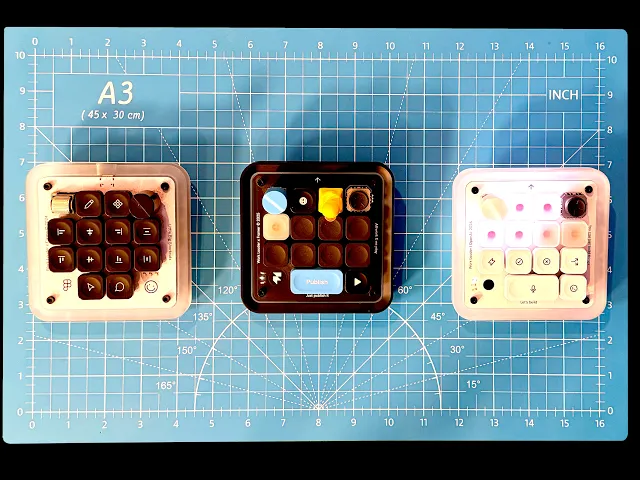
I learned that lesson in 2023–24 while working in Figma. My layout put pencil and component controls at the top; alignment and distribution across the middle; select and comment at the bottom. A black knob handled content scrolling, while the vertical wheel adjusted integer values such as type size. The arrangement mirrored the way I actually designed.

Aisha’s question made me realize that my first automation secret was not really about AI. It was about reducing the distance between an idea and an action. The Work Louder Micro became a compact physical interface for the commands I use constantly, so the software could disappear and the design decision could stay in focus.
One small deck, three generations of automation.
Aisha asked how I combine AI and design. My first secret starts with the Work Louder Micro.
Aisha’s question

Using the Micro with Figma in 2023–24 showed me how much time small, repeated actions consume.
Daily practice

I mapped drawing, alignment, selection, comments, scrolling, and number adjustments to one compact Figma control surface.
Figma shortcuts
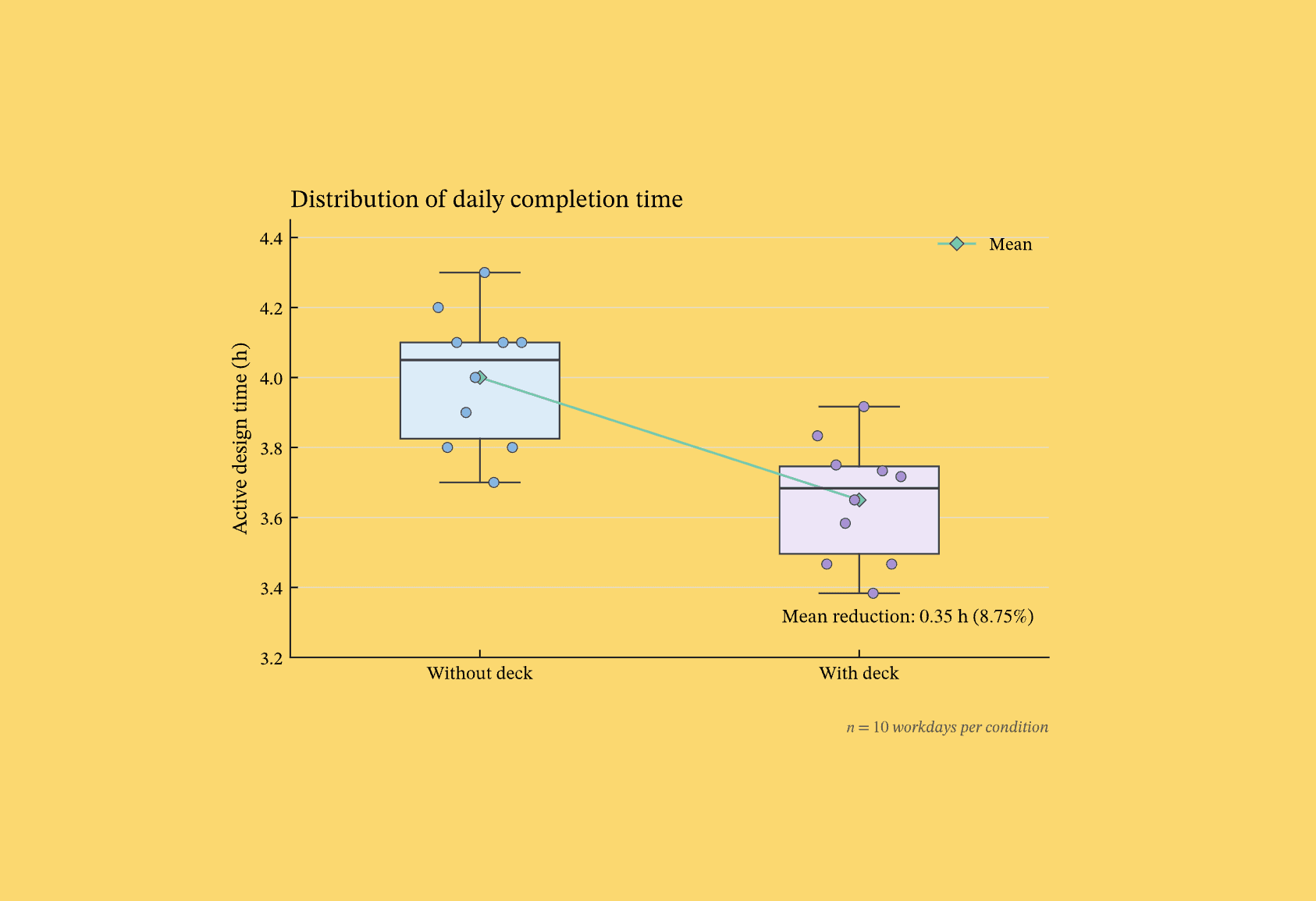
On matched design days, average completion time fell from 4.00 to 3.65 hours: 21 minutes saved daily.
Measured gains

The same tasks finished sooner, with fewer interruptions and less cursor travel. The completion curve confirmed it.
Less friction
Drag to explore →
Once I saw the time compound, I looked for the next recurring time sink. My personal website was collecting dust because it was hard to update, so I built a Framer layout for the Micro and turned publishing steps into dedicated controls. I even made custom keycaps, including a tiny yellow duck. When the Work Louder and OpenAI collaboration was announced, the idea clicked into its next form: physical controls could initiate, steer, and review agentic design work while keeping a human in the loop.

To test whether the speed was real, I held the interface workload constant across two five-day blocks. The comparison moved average completion time from 4.00 hours without the Micro to 3.65 hours with it. That is 21 minutes saved per day—an 8.75% reduction—with the same amount of design work completed. Extended across the same schedule, that becomes 1.75 hours per week, about 7.6 hours per month, and roughly 91 hours per year—more than eleven eight-hour workdays.

My website updates kept slipping. Mapping a Framer workflow to the Micro made publishing easier to start.
Website updates

Dedicated controls for navigation, layout, and publishing helped turn occasional website updates into a regular habit.
Publishing habits

Custom keycaps made each action easy to find. A tiny yellow duck gave the workflow some personality.
Personal touches

Work Louder’s OpenAI collaboration connected the idea to something bigger: physical controls for agentic design work.
OpenAI link

The deck can initiate, review, adjust, and approve agentic steps while keeping a human in the loop.
Agentic work
Drag to explore →
Work Louder Micro — the programmable control deck used in this workflow.
01
Figma — the interface design environment used for the matched-workload comparison.
02
Hinckley et al. (2014), “Touch-Level Model (TLM): Evolving KLM-GOMS for Touchscreen and Mobile Devices,” CHI 2014.
03
The design-forward AI newsletter.
Keeping humans in the loop.
Open Menu
Can a tiny control deck measurably speed up interface design—and become a bridge to agentic work?
A two-week comparison in Figma became a broader lesson about designing better interfaces for human—and agentic—work.
A two-week comparison in Figma became a broader lesson about designing better interfaces for human—and agentic—work.
Work Louder Micro — the programmable control deck used in this workflow.
01
Figma — the interface design environment used for the matched-workload comparison.
02
Hinckley et al. (2014), “Touch-Level Model (TLM): Evolving KLM-GOMS for Touchscreen and Mobile Devices,” CHI 2014.
03
I learned that lesson in 2023–24 while working in Figma. My layout put pencil and component controls at the top; alignment and distribution across the middle; select and comment at the bottom. A black knob handled content scrolling, while the vertical wheel adjusted integer values such as type size. The arrangement mirrored the way I actually designed.
The design-forward AI newsletter.
Keeping humans in the loop.
I learned that lesson in 2023–24 while working in Figma. My layout put pencil and component controls at the top; alignment and distribution across the middle; select and comment at the bottom. A black knob handled content scrolling, while the vertical wheel adjusted integer values such as type size. The arrangement mirrored the way I actually designed.
Figma shortcuts
I mapped drawing, alignment, selection, comments, scrolling, and number adjustments to one compact Figma control surface.
Measured gains
On matched design days, average completion time fell from 4.00 to 3.65 hours: 21 minutes saved daily.
Less friction
The same tasks finished sooner, with fewer interruptions and less cursor travel. The completion curve confirmed it.
Daily practice
Using the Micro with Figma in 2023–24 showed me how much time small, repeated actions consume.
To test whether the speed was real, I held the interface workload constant across two five-day blocks. The comparison moved average completion time from 4.00 hours without the Micro to 3.65 hours with it. That is 21 minutes saved per day—an 8.75% reduction—with the same amount of design work completed. Extended across the same schedule, that becomes 1.75 hours per week, about 7.6 hours per month, and roughly 91 hours per year—more than eleven eight-hour workdays.
Once I saw the time compound, I looked for the next recurring time sink. My personal website was collecting dust because it was hard to update, so I built a Framer layout for the Micro and turned publishing steps into dedicated controls. I even made custom keycaps, including a tiny yellow duck. When the Work Louder and OpenAI collaboration was announced, the idea clicked into its next form: physical controls could initiate, steer, and review agentic design work while keeping a human in the loop.
Figma — the interface design environment used for the matched-workload comparison.
02
Hinckley et al. (2014), “Touch-Level Model (TLM): Evolving KLM-GOMS for Touchscreen and Mobile Devices,” CHI 2014.
03
Work Louder Micro — the programmable control deck used in this workflow.
01
Work Louder Micro — the programmable control deck used in this workflow.
01
The design-forward AI newsletter.
Keeping humans in
the loop.
Aisha’s question made me realize that my first automation secret was not really about AI. It was about reducing the distance between an idea and an action. The Work Louder Micro became a compact physical interface for the commands I use constantly, so the software could disappear and the design decision could stay in focus.
One small deck, three generations of automation.
One small deck, three generations of automation.
Aisha’s question made me realize that my first automation secret was not really about AI. It was about reducing the distance between an idea and an action. The Work Louder Micro became a compact physical interface for the commands I use constantly, so the software could disappear and the design decision could stay in focus.
Figma shortcuts
I mapped drawing, alignment, selection, comments, scrolling, and number adjustments to one compact Figma control surface.
Measured gains
On matched design days, average completion time fell from 4.00 to 3.65 hours: 21 minutes saved daily.
Less friction
The same tasks finished sooner, with fewer interruptions and less cursor travel. The completion curve confirmed it.
Daily practice
Using the Micro with Figma in 2023–24 showed me how much time small, repeated actions consume.
To test whether the speed was real, I held the interface workload constant across two five-day blocks. The comparison moved average completion time from 4.00 hours without the Micro to 3.65 hours with it. That is 21 minutes saved per day—an 8.75% reduction—with the same amount of design work completed. Extended across the same schedule, that becomes 1.75 hours per week, about 7.6 hours per month, and roughly 91 hours per year—more than eleven eight-hour workdays.
Once I saw the time compound, I looked for the next recurring time sink. My personal website was collecting dust because it was hard to update, so I built a Framer layout for the Micro and turned publishing steps into dedicated controls. I even made custom keycaps, including a tiny yellow duck. When the Work Louder and OpenAI collaboration was announced, the idea clicked into its next form: physical controls could initiate, steer, and review agentic design work while keeping a human in the loop.
Open Menu